OAuth
Grigora uses OAuth 2.0 Authorization Code flow. Users sign in to Grigora, approve your app's requested permissions (scopes), and are redirected back to your app with an authorization code. Your backend exchanges that code for access and refresh tokens.
Flow overview
- Your app redirects the user to Grigora's authorization URL with
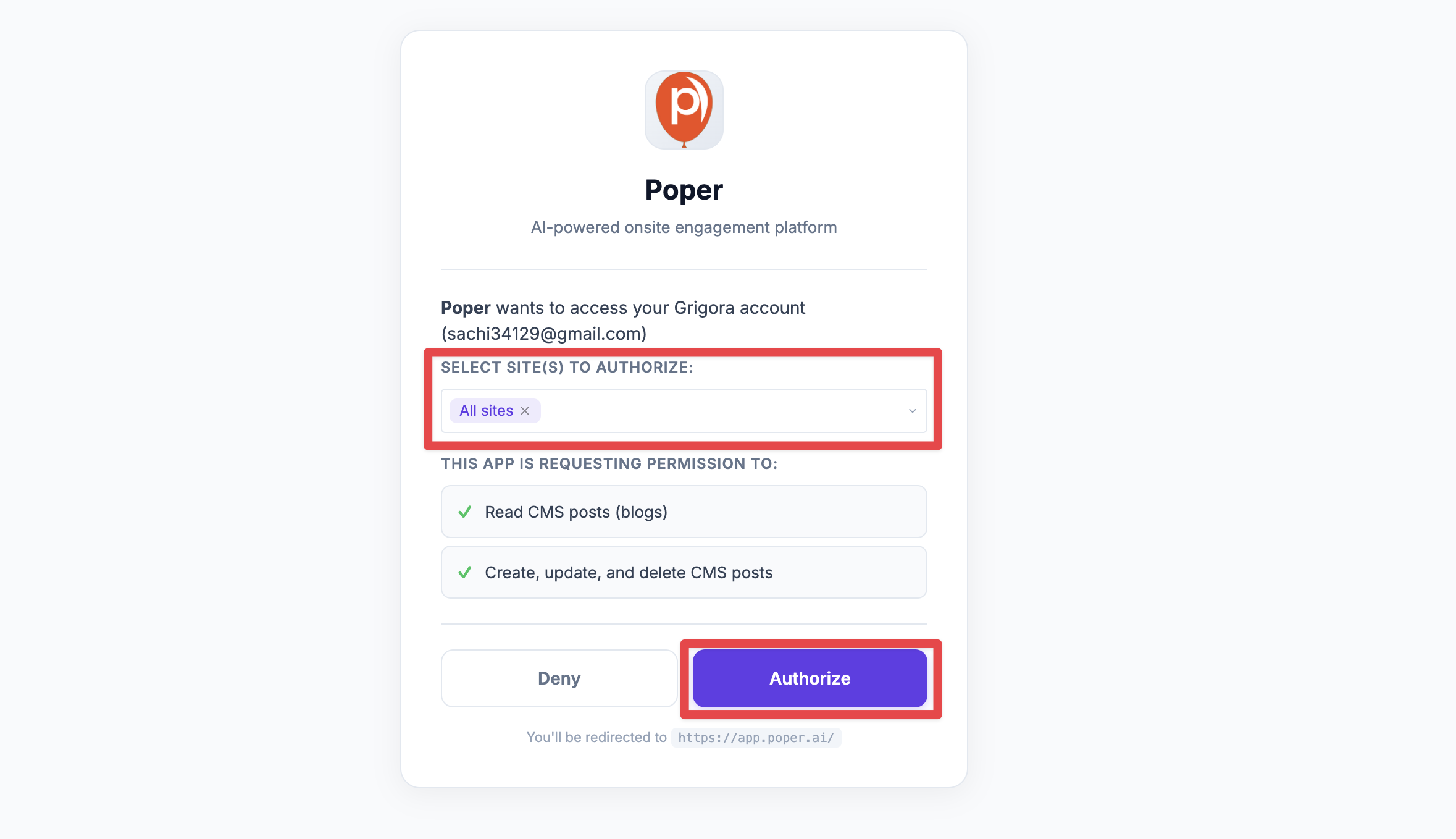
client_id,redirect_uri,response_type=code, and optionalstate. - The user signs in (if needed) and sees a consent screen with your app name, icon, and requested scopes. They approve or deny.
- Grigora redirects the user to your
redirect_uriwith a code (andstateif you sent it). If they deny, you geterror=access_denied. - Your backend exchanges the code for tokens by calling the token endpoint with
client_id,client_secret,redirect_uri, andcode. - You use the access_token to call Grigora APIs; when it expires, you use the refresh_token to get a new access token.
Endpoints
| Purpose | URL | Method |
|---|---|---|
| Authorization (redirect user here) | https://build.grigora.co/oauth/authorize | GET (browser) |
| Token exchange | https://api.grigora.co/general/oauth/token | POST |
| Refresh token | https://api.grigora.co/general/oauth/token | POST |
Redirect to authorize
Build the authorization URL and send the user there (e.g. redirect or link).
Query parameters:
| Parameter | Required | Description |
|---|---|---|
client_id | Yes | Your app's Client ID. |
redirect_uri | Yes | Must match one of your app's registered redirect URIs. |
response_type | Yes | Use code. |
state | No | Opaque value you send and get back to prevent CSRF. |
project_id or project_ids | No | For installing the app to specific project(s); can be set on the consent UI. |
Example:
const params = new URLSearchParams({
  client_id: 'YOUR_CLIENT_ID',
  redirect_uri: 'https://yourapp.com/callback',
  response_type: 'code',
  state: 'random_state_123',
});
window.location.href = `https://build.grigora.co/oauth/authorize?${params}`;
The user lands on the consent page at https://build.grigora.co/oauth/authorize, where they see your app name, the requested scopes, and can select which sites (projects) to install the app on. They then click Authorize to approve or cancel.
Handle the callback
The user is redirected to your redirect_uri with:
- Success:
?code=...&state=... - Denied:
?error=access_denied&state=...
Your callback page should:
- Read
codeandstatefrom the URL. - Verify
statematches what you sent. - Send the
codeto your backend (never exposeclient_secretin the browser). - Backend calls the token endpoint and stores tokens securely.
Example (callback page reads code and sends to backend):
// On your callback page (e.g. https://yourapp.com/callback)
const urlParams = new URLSearchParams(window.location.search);
const code = urlParams.get('code');
const state = urlParams.get('state');
const error = urlParams.get('error');

if (error === 'access_denied') {
  // User denied; handle accordingly
  return;
}
if (!code) {
  // Missing code; handle error
  return;
}
// Verify state matches what you stored before redirecting
// Then send code to your backend to exchange for tokens (see below)
fetch('/your-backend/oauth/exchange', {
  method: 'POST',
  headers: { 'Content-Type': 'application/json' },
  body: JSON.stringify({ code, state }),
});
Exchange code for tokens
Request: POST https://api.grigora.co/general/oauth/token
Content-Type: application/json or application/x-www-form-urlencoded
Body (authorization_code):
{
  "grant_type": "authorization_code",
  "code": "AUTH_CODE_FROM_CALLBACK",
  "client_id": "YOUR_CLIENT_ID",
  "client_secret": "YOUR_CLIENT_SECRET",
  "redirect_uri": "https://yourapp.com/callback"
}
Example (Node.js):
const response = await fetch('https://api.grigora.co/general/oauth/token', {
  method: 'POST',
  headers: { 'Content-Type': 'application/json' },
  body: JSON.stringify({
    grant_type: 'authorization_code',
    code: codeFromCallback,
    client_id: process.env.GRIGORA_CLIENT_ID,
    client_secret: process.env.GRIGORA_CLIENT_SECRET,
    redirect_uri: 'https://yourapp.com/callback',
  }),
});
const tokens = await response.json();
// tokens.access_token, tokens.refresh_token, tokens.expires_in, tokens.scope, tokens.project_ids
Response (200):
{
  "access_token": "gri_at_...",
  "token_type": "Bearer",
  "expires_in": 3600,
  "refresh_token": "gri_rt_...",
  "scope": "cms:post:read directory:items:read",
  "project_ids": ["proj_abc123"]
}
- expires_in — Access token lifetime in seconds (e.g. 1 hour).
- project_ids — Projects the user authorized (if any).
Errors: 400 with invalid_grant for invalid/expired code or redirect_uri mismatch; 401 with invalid_client for wrong credentials.
Refresh the access token
When the access token expires, use the refresh token at the same token endpoint.
Request: POST https://api.grigora.co/general/oauth/token
Body:
{
  "grant_type": "refresh_token",
  "refresh_token": "gri_rt_...",
  "client_id": "YOUR_CLIENT_ID",
  "client_secret": "YOUR_CLIENT_SECRET"
}
Example (Node.js):
const response = await fetch('https://api.grigora.co/general/oauth/token', {
  method: 'POST',
  headers: { 'Content-Type': 'application/json' },
  body: JSON.stringify({
    grant_type: 'refresh_token',
    refresh_token: storedRefreshToken,
    client_id: process.env.GRIGORA_CLIENT_ID,
    client_secret: process.env.GRIGORA_CLIENT_SECRET,
  }),
});
const tokens = await response.json();
// New access_token and refresh_token; old refresh token is invalidated
Response (200): Same shape as code exchange (new access_token, new refresh_token, expires_in, scope, and optionally project_ids). The old refresh token is invalidated.
Call the API with the access token
Use the access token in the Authorization header for Grigora API requests:
const response = await fetch('https://api.grigora.co/general/api/v1/sites', {
  headers: {
    'Authorization': `Bearer ${accessToken}`,
    'Content-Type': 'application/json',
  },
});
PKCE (optional)
The server supports PKCE. If you use it, include code_challenge and code_challenge_method when building the authorization URL and send code_verifier when exchanging the code. Supported method: S256.
Summary
- Redirect users to https://build.grigora.co/oauth/authorize with
client_id,redirect_uri,response_type=code, and optionalstate. - On callback, exchange the
codeat POST https://api.grigora.co/general/oauth/token withgrant_type=authorization_codeand store the tokens on the server. - Send the access token in the
Authorization: Bearerheader for API requests; refresh when needed withgrant_type=refresh_tokenat https://api.grigora.co/general/oauth/token.